Weekend EXP Boost
Our server has a recurring Weekend EXP Boost system. Every week, all players receive Base/Job EXP +50% during the weekend event period.
| Schedule | Status | How it works |
|---|---|---|
| Starts every Saturday at 00:00 server time | Base/Job EXP +50% | The boost is applied automatically to all online players. |
| Ends every Monday at 00:00 server time | Disabled | The boost is removed automatically when the event ends. |
Chat Channels
Chat channels let you talk with players outside normal nearby chat. Join the channel you need, then send your message to that channel instead of regular local chat.
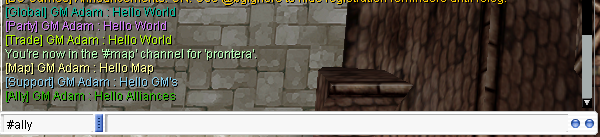
| Channel | Tag / Color | Use it for | Message Delay |
|---|---|---|---|
| #global | [Global] / Cyan | General server-wide chat with all players who joined the channel. | 1 minute |
| #support | [Support] / Blue | Questions, help requests, bug questions, or asking staff/players for guidance. | 1 minute |
| #party | [Party] / Purple | Looking for party members, dungeon groups, MVP groups or leveling partners. This is a public recruitment channel, not private Party Chat. | 1 minute |
| #trade | [Trade] / Light Green | Buying, selling, price checks and trading messages. | 1 minute |
| #eden | [Eden] / Violet | Eden Group quests, leveling, equipment missions, party recruitment and questions about Eden content. | 1 minute |
| #map | [Map] / Yellow | Messages for players on your current map only, when the map channel is available. | 1 second |
| #ally | [Ally] / Green | Guild alliance chat channel, when available for your guild alliance. | 1 second |
#global, #support, #party, #trade and #eden
have a 1 minute message delay per player. Please do not spam, repeat the same message too often, or use the wrong channel.
@channel list to see available public channels.
@join #global or @channel join #global.
#global.
@channel bindto #global to send normal chat to that channel until you unbind.
| Command | What it does |
|---|---|
| @channel list | Shows all public channels. |
Verus / Phantasmagorika
| Monster | Stats | Loot |
|---|---|---|
 Repair Robot
ID 3155
Repair Robot
ID 3155
|
Level 122 HP 85,760 ATK 1451+186 DEF 60 MDEF 35 |
Elunium: 6% with x6 rates Oridecon: 3% with x6 rates |
 Exploration Rover
ID 3156
Exploration Rover
ID 3156
|
Level 138 HP 130,640 ATK 1713+452 DEF 70 MDEF 35 |
Elunium: 6% with x6 rates Oridecon: 3% with x6 rates |
 Repair Robot Turbo
ID 3248
Repair Robot Turbo
ID 3248
|
Aggressive AI High-end farming monster |
Elunium: 9% with x6 rates Oridecon: 6% with x6 rates |
 Explorer Robot Turbo
ID 3249
Explorer Robot Turbo
ID 3249
|
HP 218,117 ATK 2600+650 DEF 105 MDEF 55 |
Elunium: 9% with x6 rates Oridecon: 6% with x6 rates |
Quest Support
Episode 15.1 / Phantasmagorika
Moscovia — The Moving Island
Time-of-day restrictions were removed from the two quest interactions listed below. All normal quest stages, item requirements and dialogue progression still apply.
 Mr. Ibanoff
moscovia — 135, 49
Mr. Ibanoff
moscovia — 135, 49
 Lusalka
Trigger: mosk_fild02 — 116, 202
Lusalka
Trigger: mosk_fild02 — 116, 202NPC: mosk_fild02 — 124, 202
The Sign / Geffenia Access Quest
The following changes remove unnecessary real-time scheduling from the quest while keeping its items, tests, battles and progression requirements intact.
 Sir Jore
aldeba_in — 155, 101
Sir Jore
aldeba_in — 155, 101
 Piru Piru
aldeba_in — 156, 118
Piru Piru
aldeba_in — 156, 118
 Metz
prt_in — 227, 45
Metz
prt_in — 227, 45
 Engel Howard
mjo_dun02 — 88, 295
Engel Howard
mjo_dun02 — 88, 295
Spy Quest — Megaphone Rental Fee
The Megaphone payment in the Veins Spy Quest has been adjusted to better match the server economy. The dancer escort stage and all other quest requirements remain unchanged.
 Dance Instructor Hianna
job_duncer — 93, 106
Dance Instructor Hianna
job_duncer — 93, 106
Starter Weapons

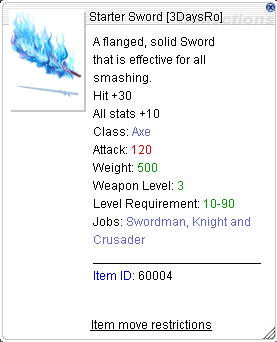 Starter Sword
ID: 60004
Starter Sword
ID: 60004

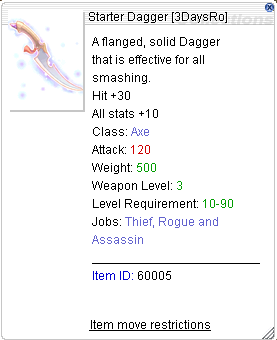 Starter Dagger
ID: 60005
Starter Dagger
ID: 60005

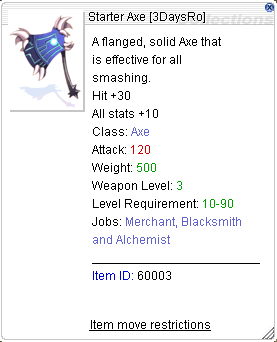 Starter Axe
ID: 60003
Starter Axe
ID: 60003

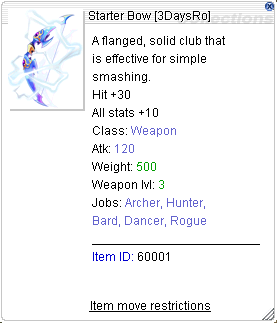 Starter Bow
ID: 60001
Starter Bow
ID: 60001

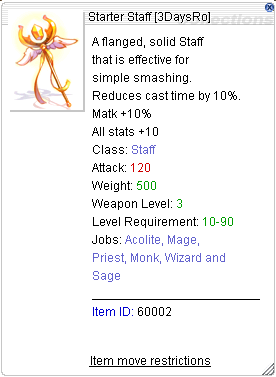 Starter Staff
ID: 60002
Starter Staff
ID: 60002
Bulk NPC Shop Purchase to Storage
A new bulk purchase helper has been added for regular NPC shops. When a player tries to buy 30,000 or more of the same stackable item, the system can continue the purchase through a special confirmation dialog and send the items directly to Kafra Storage.
| Condition | Result |
|---|---|
| Enough zeny and enough storage space | Purchase completed. Zeny is removed and items are sent to storage. |
| Not enough zeny | Purchase cancelled. The dialog shows that you do not have enough money. |
| Not enough storage space | Purchase cancelled. The items are not bought. |
| Equipment, cards, pet eggs or special items | The bulk purchase helper does not apply to these item types. |
Template
Copy block for a new server change
<span class="sc-date">Server Changes</span>
<h3>Title</h3>
<div>
<span class="sc-tag">Tag</span>
<span class="sc-tag">Balance</span>
</div>
<ul>
<li>Change 1</li>
<li>Change 2</li>
</ul>
</div>